Reports
Users can access Openwind reports from the File menu. All reports are shown on screen. Users can then choose to save any report in either ASCII tab-delimited format (.TXT), comma-separated text (.CSV), XML or JSON. XML and JSON are particularly useful for automated reading into a database.
A standard energy capture report contains information regarding the predicted energy yields for the workbook as a whole, with and without wake affects and other losses, and then broken down by site and by turbine. It also contains turbine positions, wind speeds, air densities, etc.
A detailed energy capture report contains all the information found in a standard energy capture report but with additional results broken down by wind speed and direction for each turbine.
Users can access a variety of intermediate variables by wind speed and direction from the Energy Capture Reports menu.
There are several suitability reports available from the File->Energy Capture Reports menu. These should be self-evident and are being continuously added to over time.
Openwind workbooks are saved as binary data dumps (*.BLB). Presently, there is no support for linked documents; however, Openwind workbooks compress very well using ZIP. Even if the workbook has been saved in a compressed format, ZIP or 7z are likely to be able to further compress as the compression done in Openwind needs to be fast and so is less thorough.
- Standard Energy Report
- Detailed Energy Report
- Suitability - Inflow Angles – outputs the inflow angles at each turbine for each direction in the inflow angle layer found to be relevant to each turbine. The inflow angle values are simply extracted from the inflow angle layer at the turbine location.
- Suitability – Weibulls – for each turbine, if a met mast layer is being used, outputs the Weibull amplitude (A) and shape factor (K) for each direction in the met mast. If the turbine is not using a met mast for energy capture then the Weibulls are taken from the WRG for the number of sectors present in the WRG. Accordingly, the sector-wise probability is taken from the met mast if it is present and otherwise the WRG layer. When a met mast layer is being used, the Weibull has been fitted by Openwind. After the sector-wise values, the per turbine overall average is given. At the end of each site layer, the overall average A and K value is given for that site layer.
- Suitability - Effective TI – outputs the Effective TI (or when Edition 2 is used, the Characteristic TI) using the currently selected Effective TI settings (see Section 36). For each turbine, the average over all directions is given first for each wind speed and then the results are given for each direction in the energy capture calculation for each wind speed. The value for any given wind speed is the value interpolated at that wind speed.
- Suitability - Total TI – this is the ambient TI plus the wake-induced TI. They are combined as the root sum square. The wake-induced TI is calculated according to Hassan (1993).
- Suitability – Probabilities –outputs the wind speed distribution by direction as well as the overall average based on either the waked or free wind speed.
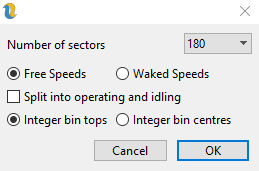
Figure 5: Probabilities report settings
The report can be split into operating and non-operating (idling). Probabilities are output for each turbine as averaged over all directions and then for each direction. The number of directions to be output in the report can be less than the number of directions in the energy capture but the number of choices is limited due to the way in which the sectors are combined.
- Suitability – Terrain Complexity – outputs the Terrain Complexity calculated for each turbine. See section 47. for details of how the terrain complexity is calculated and reported.
- Suitability – Vref – outputs the Vref calculated for each turbine based on several different methods of independent storms (MIS) and the Gumbel method. It can also include the Vref calculated for each turbine using Davenport, Gumbel or “Exact” method to estimate the 50-year return maximum 10-minute wind speed according to the European Wind Turbine Standard (II).
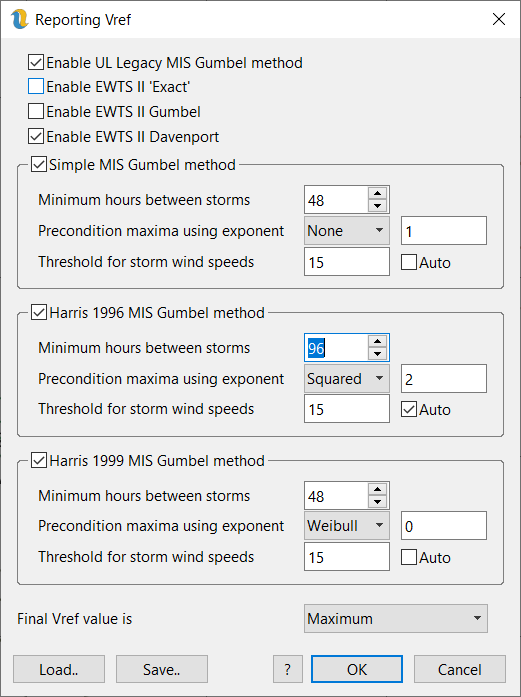
Figure 6: Vref Settings
- Suitability – Shear Coefficients – This requires either multi-height WRGs or multi-height met mast objects (ideally the user would be using both together). The shear coefficients are calculated from the mean wind speeds across the rotor disk.
- If a turbine has access to a multi-height WRG and the user has selected to apply the direction correction in the energy capture settings, or the turbine does not have access to a met mast, shear is calculated from the overall mean wind speeds in the multi-height WRG;
- If a turbine has access to a multi-height WRG and the option to apply the direction correction is not checked then the shear is calculated from the directional mean wind speeds in the multi-height WRG, weighted by the directional probabilities in the met mast.
- If the turbine does not have access to a multi-height WRG but has access to a multi-height met mast, then the speed ups from the single height WRG (calculated as part of an energy capture) are applied to the met mast directional mean wind speeds weighted by the directional probabilities calculated from the energy capture.
- Pseudo-Equivalent Loads – this can be used to get a single number which indicates the relationship between site effective TI and the design NTM curve. Values above 0.8 or 0.9 should be interpreted as worthy of a more detailed look.
- Loads
- Suitability – IEC61400-1(ed4) Section 11 – this report attempts to bring together all the information needed to assess compliance with the IEC standard.
- GE Wind Farm Form - creates a multi-tab report which can be easily copied and pasted into a GE Wind Farm Form.
- Siemens-Gamesa Climatic Conditions Report - creates a multi-tab report which can be easily copied and pasted into a Siemens-Gamesa Climatic Conditions Report.
- Variable By Wind Speed – this allows you to export either gross energy, net energy or array energy by wind speed and direction. The choice of direction is dictated by the number of directions in the energy capture (72 => 72, 24, or 8; 84=>84, 28). The wind speed can be the freestream or waked speed. This report cannot be used with time-series energy capture.
- TI adjusted power curves – this outputs the zero TI power curve as well as versions of the input power curves adjusted to each value of TI in the user-specified range. (see turbine type power curve tab).
- Wake Loss Tables - Only available probabilistic energy captures. This outputs a table of wake loss for each site-layer. The wake loss is calculated as 1-array energy/gross energy. It can be negative and large for winds speeds around cut-out. This report cannot be used with time-series energy capture.
- Power Curve Test - Site Assessment – invokes a dialog that allows the user to investigate different met mast – turbine location pairings to see if calibration is necessary due to terrain complexity ( Site Calibration (Power Curve Test)).
- Transect – view the terrain and vegetation height profile between a given environmental sensor and turbine ( Terrain Transect )
- Binned Time-Series Losses - only available for time-series energy capture results. This functionality allows users to output a report for one energy loss category, binning the time-series losses by direction and wind speed. Users can choose:
- Availability
- High Temperature Shutdown
- Low Temperature Shutdown
- High Wind Hysteresis
- Wind Sector Management
- Scheduling
- Derating
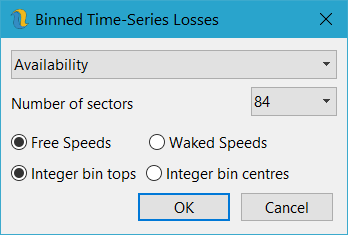
Figure 7: Binned Time-Series Losses Dialog
- Site Layer Power Curves – otherwise referred to as wind farm power curves. Only available probabilistic energy captures.
- The following reports are intended for debugging only and are reported by calculation step:
- Speed Ups
- Free-Stream Wind Speeds [m/s]
- Wake-Affected Wind Speeds [m/s]
- Probabilities
- Hours per year
- Power [kW]
- Array Energy [kWh]
- Gross Energy [kWh]
- Net Energy [kWh]
- Total Turbulence Intensity [%]
- Noise parameters