File-Menu
- New
 - creates a new empty workspace
 - Open workbook - opens an Openwind workbook (*.BLB)
- Open backup – opens a list of recent workbook backups and allows the user to load one
- Recover broken file – if a workbook has become corrupted, this can be used to see how much of the workbook can be recovered. Openwind can generally recover up to the point at which the file was corrupted. The resulting partial workbook can then be saved and opened as a regular workbook.
- Incoming Map Projection - set the default incoming map projection behaviour.
- Open (file)
- Open Entire Directory - searches recursively through all subfolders for comprehensible data types
- Open WMS Map – enables the user to specify a web map server host from which to download background maps of the current area.
- Import
- Leosphere as WRG
- GE Wind Farm Form – brings up a dialog containing several grids which allow data to be copied and pasted from a spreadsheet programme containing the GE wind farm form.
- WindNavigator - in order to use all aspects of this functionality, you need to have a UL Dashboards account along with sufficient credit for what you are attempting to order. You need to load your credentials into the Preferences dialog. without credentials it is still possible to download terrain, landcover and Open Street Map vector layers. Selecting this option from the file menu or clicking the UL button will bring up the WindNavigator Download dialog.
Figure 1: WindNavigator Download dialog. This dialog allows users with current Openwind maintenance or an Openwind subscription to download a variety of free sources as well as data only available with a WindNavigator subscription
Multiple data sources can be selected at once. Data is clipped server-side to cover the current mapping view extents so please zoom out to cover your area of interest before calling this dialog and clicking OK. Information on the origins of each data source can be found by clicking the hyperlinks in the Description column.
When downloading landcover data, Openwind will prompt you to enter or at least accept a table that converts landcover classes into roughness lengths. This table can be edited and saved to file and then loaded from file next time.
- Order 200m WRG from UL Dashboards - download 200m WRG object at up to five heights. Change the centre of the WRG with a right mouse-click in the mapping view or by typing in coordinates.
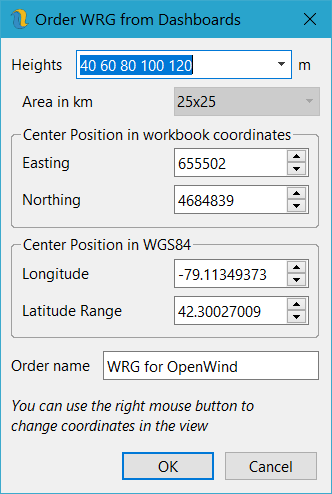
Figure 2: Download 200m WRG from UL Dashboards
- Order Typical Year VMM from UL Dashboards - download WRF modelled typical year of time-series met mast data at up to five heights.
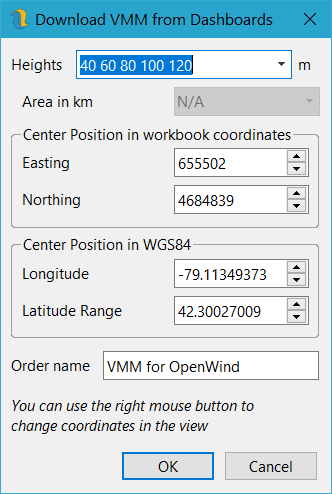
Figure 3: Download VMM from UL Dashboards
- Order WRF run from UL Dashboards - order a WRF run of the currently selected area at up to 10 heights. Change the selected area by right mouse-clicking in the mapping view or by typing in coordinates. Use the drop-down menu to change the horizontal extents of the run.
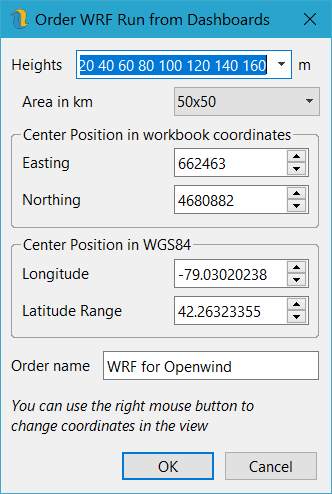
Figure 4: Order WRF run from UL Dashboards
- Download On-Screen Turbines (US Only) - accesses the US national wind turbine database to download turbine positions and attributes for the current on-screen map extents. The turbines are split into separate projects and each identified project is given its own site layer. The site layers are placed in a single folder layer. Turbine types are not assigned but can be determined by looking at the turbine attributes.
- Download Applications from FAA (US Only) - downloads all FAA applications for on-screen wind turbines and met masts for the user-specified year range.
- Export
- Export to WindPlanner - exports a text file that can be loaded into WindPlanner software. If they ever get their RESTful API done, we will happily support it.
- Download Elevation Data – allows users to download raster elevation data from UL. There are currently two data sets from the SRTM. One is at 3 arc seconds and is quality-controlled. The other is at 1 arc second and may contain gaps and errors. Users can choose a number of 1-degree tiles which Openwind will then download, stitch into one raster and then resample at 45m or 15m respectively.
- Download Land-Cover Data – similarly to the elevation download, Openwind can download 3 arc second (~90m) or 10m ESA landcover information from UL and then convert it to a roughness length layer.
- Save
 - saves the current workspace as an Openwind workbook (*.BLB)
 - Save As - saves the current workspace as an Openwind workbook (*.BLB)
- Export To Legacy Format – allows export to older Openwind workbook formats
- Print To
- Printer - rudimentary support (we expect users to have their own desktop publishing capabilities)
- PDF - redraws the current map view in portable document format
- JPG - redraws the current map view as a JPEG
- TIF - redraws the current map view as a TIF
- PNG - redraws the current map view as a PNG
- BMP - redraws the current map view as a BMP
- Recently used file list – maintains a list of recently used files to open
- Deduplicate - looks for duplicate layers and data structures and makes them share memory. This gets done automatically on Save and helps to keep memory and disk use to a minimum.
- Open current directory - opens an instance of Windows Explorer with the currently selected directory
- Open workbook directory - opens an instance of Windows Explorer with the workbook directory
- Copy workbook path - copies the current workbook path to the clipboard
- Exit - closes the software. It does not check to see if the current workbook needs to be saved; however, the user is asked to confirm that they are ready to close the software and potentially lose the latest changes.